The Operator Era: Stateful Workloads, Service Mesh, and the Cloud-Native Stack (2018–2020)

Reading Time: 6 minutes


Introduction

By 2018, Kubernetes had won the orchestration market. The question was no longer “which orchestrator?” — it was “how do we run complex workloads on it, and how do we do it safely?”

The 2018–2020 period is defined by three parallel tracks: the Operator pattern maturing into a serious engineering discipline, the service mesh debate consuming enormous community energy, and the security model evolving from “trust everything in the cluster” toward something resembling defense-in-depth.


The OperatorHub Era

The Operator pattern, introduced by CoreOS engineers in 2016, reached critical mass in 2018–2019. In November 2018, Red Hat launched OperatorHub.io — a registry for Kubernetes Operators covering databases (PostgreSQL, MongoDB, CockroachDB), messaging (Kafka, RabbitMQ), monitoring (Prometheus), and more.

The Operator SDK (Red Hat, 2018) gave teams a framework for building Operators in Go, Ansible, or Helm — lowering the barrier from “you need to write a Kubernetes controller from scratch” to “fill in the reconciliation logic.”

The maturity model for Operators was codified into five levels:

Level Capability
1 Basic Install — automated deployment
2 Seamless Upgrades — patch and minor version upgrades
3 Full Lifecycle — backup, failure recovery
4 Deep Insights — metrics, alerts, log processing
5 Auto Pilot — horizontal/vertical scaling, auto-config tuning

Most production Operators in 2019 were at Level 1–2. Getting to Level 3+ required encoding significant domain knowledge — the kind that previously lived in a senior database administrator’s head.


Kubernetes 1.11 — CoreDNS Default, Load Balancing Stable (June 2018)

  • CoreDNS replaced kube-dns as the default DNS provider. CoreDNS is plugin-based — you can extend it for custom DNS resolution logic (split DNS, external name resolution, DNS-based service discovery for non-Kubernetes services)
  • IPVS-based kube-proxy stable: The load balancing mode for Services switched from iptables to IPVS (IP Virtual Server), enabling O(1) service routing instead of O(n) iptables rule traversal — critical at scale
  • TLS bootstrapping stable: Kubelet automatic certificate rotation — kubelets no longer needed manual certificate management

The IPVS kube-proxy mode is a good example of a performance improvement that also has security implications. iptables rules degrade linearly with rule count; at 10,000+ services, iptables becomes a performance and debuggability problem. IPVS uses a hash table — O(1) lookups regardless of service count.


Kubernetes 1.12 — 1.13: Amazon EKS, Runtime Security (September–December 2018)

Amazon EKS Goes GA (June 2018)

Amazon EKS became generally available in June 2018. This was significant not just for AWS customers but for the entire ecosystem: EKS’s launch meant every major cloud provider now had a production-grade managed Kubernetes offering.

EKS’s initial release was deliberately limited — managed control plane, self-managed worker nodes. This contrasted with GKE’s more automated approach, and the community noticed. GKE had been running managed Kubernetes longer, and it showed in feature completeness.

1.12 (September 2018)

  • RuntimeClass alpha: A mechanism to specify which container runtime to use for a pod — containerd, gVisor, Kata Containers. The foundation for confidential computing workloads where you want hardware-isolated containers
  • RBAC delegation: Service accounts could now grant RBAC permissions they themselves held — enabling Operators to manage RBAC for the applications they deploy
  • Volume snapshot alpha: Create point-in-time snapshots of PersistentVolumes — the beginning of Kubernetes-native backup primitives

1.13 (December 2018)

  • kubeadm graduates to GA: The cluster bootstrapping tool was now stable and recommended for production
  • CoreDNS stable
  • CSI stable: Storage drivers could be shipped entirely out of tree

Kubernetes 1.14 — Windows Containers Go Stable (March 2019)

Windows Server container support graduated to stable in 1.14. For the first time, Kubernetes clusters could run Windows workloads as first-class citizens — .NET Framework applications, IIS, SQL Server containers alongside Linux-based microservices.

The implementation required significant work: Windows containers have different networking models, different filesystem semantics, and different process models than Linux containers. Making them a first-class Kubernetes citizen meant handling all of those differences in the node components.

Also in 1.14:
PersistentVolume and StorageClass improvements
kubectl improvements: kubectl diff — show what would change before applying a manifest


The PodSecurityPolicy Problem

PodSecurityPolicy (PSP) was alpha in Kubernetes 1.3, beta in 1.8, and would remain in beta until it was deprecated in 1.21. It was simultaneously the most important security primitive in Kubernetes and the most broken.

PSP let administrators define what a pod was allowed to do:

apiVersion: policy/v1beta1
kind: PodSecurityPolicy
metadata:
  name: restricted
spec:
  privileged: false
  allowPrivilegeEscalation: false
  requiredDropCapabilities:
    - ALL
  volumes:
    - 'configMap'
    - 'emptyDir'
    - 'projected'
    - 'secret'
    - 'downwardAPI'
    - 'persistentVolumeClaim'
  hostNetwork: false
  hostIPC: false
  hostPID: false
  runAsUser:
    rule: MustRunAsNonRoot
  seLinux:
    rule: RunAsAny
  supplementalGroups:
    rule: MustRunAs
    ranges:
      - min: 1
        max: 65535
  fsGroup:
    rule: MustRunAs
    ranges:
      - min: 1
        max: 65535
  readOnlyRootFilesystem: false

The problem: the admission mechanism was confusing, the UX was hostile, and the authorization model (who could use which PSP) led to privilege escalation paths that were non-obvious. Many teams either disabled PSP entirely or created a permissive policy that made it functionally useless.

The community would spend years working toward a replacement. In 2021 it was deprecated; in 1.25 (2022) it was removed. The replacement — Pod Security Admission — is discussed in EP05.


Kubernetes 1.15 — 1.17: Custom Resource Maturity (2019)

1.15 (June 2019)

  • CRDs continue maturing: Structural schemas, pruning of unknown fields — making CRDs behave more like first-class API types
  • Kustomize integrated into kubectl: Template-free Kubernetes configuration customization. Where Helm uses Go templates, Kustomize uses overlays — a base configuration plus environment-specific patches
# kustomization.yaml — base + production overlay
bases:
  - ../../base
patches:
  - deployment-replicas.yaml
  - resource-limits.yaml
configMapGenerator:
  - name: app-config
    literals:
      - ENV=production

1.16 (September 2019)

  • CRDs graduate to GA (apps/v1, not extensions/v1beta1)
  • Admission webhooks stable: Validating and mutating webhooks that intercept every API request. This is the foundation for OPA/Gatekeeper, Kyverno, and all policy-as-code enforcement in Kubernetes

The admission webhook framework’s graduation to stable in 1.16 was more significant than it appeared. It meant that any security policy engine — OPA/Gatekeeper, Kyverno, Styra, etc. — could now enforce policies on any Kubernetes resource creation or modification, using a stable, documented API.

  • Removal of several deprecated beta APIs: extensions/v1beta1 Deployments, DaemonSets, ReplicaSets — a preview of the more aggressive API cleanup that would come in 1.22

1.17 (December 2019)

  • Volume snapshots beta
  • Cloud Provider labels stable

OPA/Gatekeeper: Policy as Code Enters the Mainstream

Open Policy Agent (OPA) + Gatekeeper emerged as the policy engine of choice for Kubernetes in 2019. Gatekeeper uses the admission webhook framework to intercept API requests and evaluate them against Rego policies:

# Deny containers running as root
package kubernetes.admission

deny[msg] {
  input.request.kind.kind == "Pod"
  container := input.request.object.spec.containers[_]
  container.securityContext.runAsUser == 0
  msg := sprintf("Container %v must not run as root", [container.name])
}

The OPA/Gatekeeper model represented a shift in security thinking: instead of configuring security at the cluster level, you codify security policy in a language (Rego) and enforce it uniformly across all admission requests. Policies can be tested, versioned, and reviewed like code.


Kubernetes 1.18 — Topology-Aware Routing, Immutability (March 2020)

  • Topology-aware service routing alpha: Route service traffic to endpoints in the same zone/node as the caller — reducing cross-zone data transfer costs and latency
  • Immutable ConfigMaps and Secrets alpha: Mark a ConfigMap or Secret as immutable — the API server rejects updates, preventing accidental mutation of configuration that applications have already loaded
  • IngressClass: A mechanism to specify which Ingress controller should handle an Ingress resource — enabling multiple ingress controllers in the same cluster
# Immutable secret — once set, cannot be changed
apiVersion: v1
kind: Secret
metadata:
  name: db-credentials
immutable: true
data:
  password: dGhpcyBpcyBhIHRlc3Q=

The Falco Adoption Wave

CNCF-donated Falco (originated by Sysdig) became the standard tool for Kubernetes runtime security in this period. Falco uses eBPF probes or kernel modules to monitor syscalls and generate alerts based on rules:

# Falco rule: detect shell spawned in a container
- rule: Terminal shell in container
  desc: A shell was spawned in a container
  condition: >
    spawned_process and container and
    shell_procs and proc.tty != 0
  output: >
    A shell was spawned in a container
    (user=%user.name container=%container.name
     shell=%proc.name parent=%proc.pname)
  priority: WARNING

Falco addressed the gap that PodSecurityPolicy couldn’t: admission-time policy prevents known-bad configurations from running, but it can’t detect a compromise that happens at runtime — a shell spawned by an exploited web application, for example.


The Service Mesh Exhaustion

By 2019, the service mesh landscape was producing more overhead than value for many teams. Istio’s operational complexity — its control plane components, its sidecar injection model, its frequent breaking changes between versions — burned teams that adopted it early.

The community questions were real: do you actually need mTLS between every service in your cluster? Is the operational cost of a service mesh worth the security benefit for every organization?

Linkerd 2.x (Buoyant) positioned itself as the lightweight alternative — simpler to operate, less configuration surface, Rust-based proxy instead of Envoy. For teams that wanted the security benefit (mTLS) without the complexity cost, Linkerd 2.x was often the better choice.

The honest answer in 2019-2020: service meshes were the right architecture for organizations with hundreds of services and dedicated platform teams. For most organizations, they were complexity that outpaced the threat model.


Key Takeaways

  • The Operator pattern matured from a pattern into an engineering discipline with tooling (Operator SDK), a registry (OperatorHub), and a capability maturity model
  • EKS going GA completed the managed Kubernetes trifecta — every major cloud provider was now committed
  • CRDs graduating to stable in 1.16 was the foundation for everything built on Kubernetes extensibility — Operators, policy engines, GitOps tools
  • Admission webhooks graduating to stable enabled the policy-as-code ecosystem (OPA/Gatekeeper, Kyverno) — the only viable alternative to PSP’s broken model
  • Falco established runtime security as a distinct discipline from admission-time policy enforcement
  • Service mesh adoption was real but the complexity cost was frequently underestimated; many teams that adopted Istio in 2018-2019 spent 2019-2020 managing it

What’s Next

← EP03: Enterprise Awakening | EP05: Security Hardens →

Series: Kubernetes: From Borg to Platform Engineering | linuxcent.com
BPF Verifier Explained: Why eBPF Is Safe for Production Kubernetes

Reading Time: 10 minutes


Reading Time: 9 minutes

~2,400 words · Reading time: 9 min · Series: eBPF: From Kernel to Cloud, Episode 2 of 18

In Episode 1, we established what eBPF is and why it gives Linux admins and DevOps engineers kernel-level visibility without sidecars or code changes. The obvious follow-up question is the one every experienced engineer should ask before running anything in kernel space:

Is it actually safe to run on production nodes?

The answer is yes — and the reason is one specific component of the Linux kernel called the BPF verifier. This post explains what the verifier is, what it protects your cluster from, and why it changes the risk calculus for eBPF-based tools entirely.


Architecture Overview

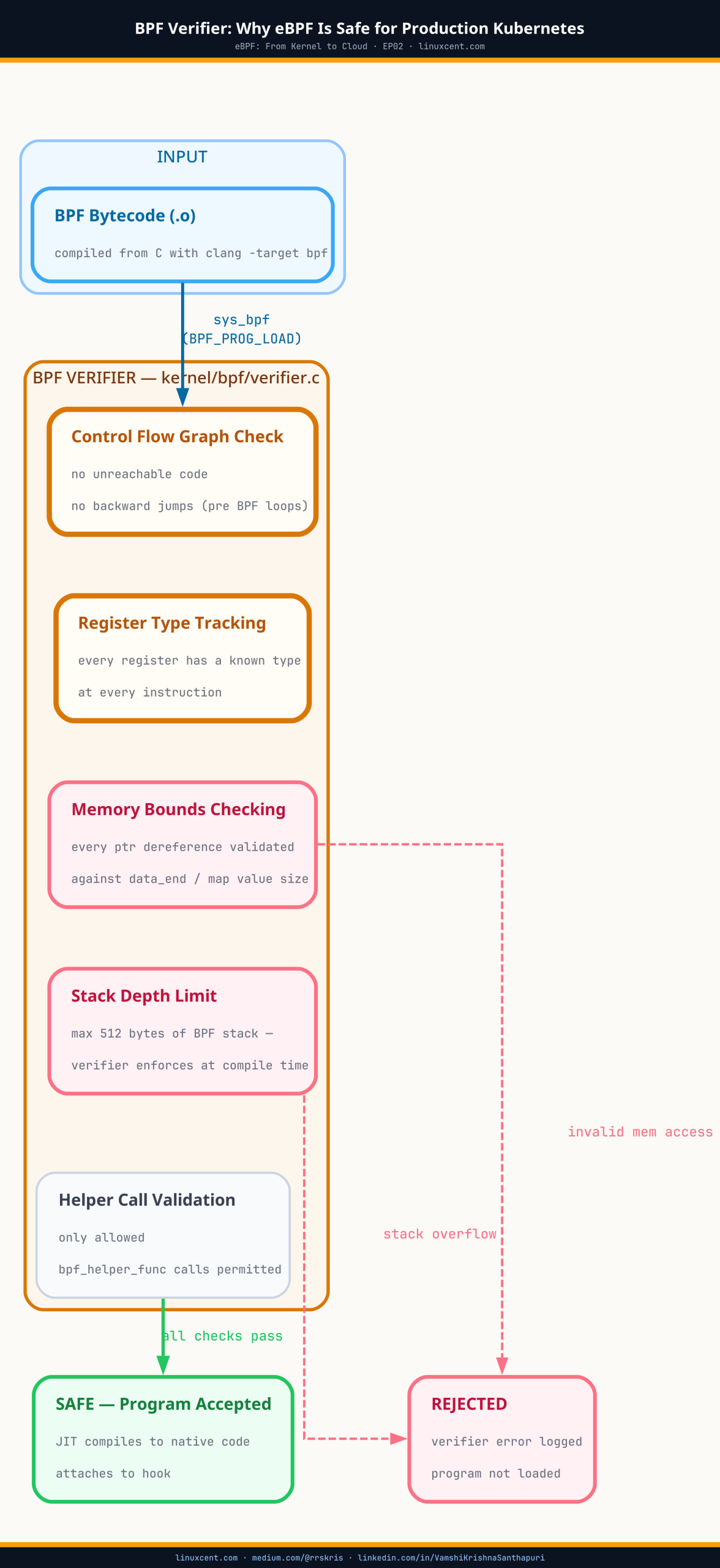
BPF Verifier and JIT pipeline — how eBPF programs are safety-checked and compiled before kernel execution
The BPF verifier runs before every eBPF load — rejecting unsafe programs before they touch the kernel.

TL;DR

  • The BPF verifier is a static analysis pass that runs before every eBPF program loads — it rejects unsafe programs before they touch the kernel
  • It prevents infinite loops (only bounded loops allowed), out-of-bounds memory access, null pointer dereferences, and privilege escalation via kernel pointer leaks
  • Unlike kernel modules, a verified eBPF program cannot kernel-panic your node — that guarantee is why eBPF-based tools are safe in production
  • Every eBPF-based tool you run — Cilium, Falco, Tetragon, Datadog — passes its programs through the verifier on every node load
  • Ask three questions before adopting any eBPF tool: minimum kernel version required, CO-RE support (portable across kernels), and which program types it uses
  • (The verifier is also why eBPF programs require CAP_BPF or CAP_SYS_ADMIN — privilege is still required to load, just not to survive a bad load)

The Fear That Holds Most Teams Back

When I first explain eBPF to Linux admins and DevOps engineers, the reaction is almost always the same:

“So it runs code inside the kernel? On our production nodes? That sounds like a disaster waiting to happen.”

It is a completely reasonable concern. The Linux kernel is not a place where mistakes are tolerated. A buggy kernel module can take down a server instantly — no warning, no graceful shutdown, just a hard panic and a 3 AM phone call.

I know this from personal experience. During 2012–2014, I worked briefly with Linux device driver code. That period taught me one thing clearly: kernel space does not forgive careless code.

So when people started talking about running programs inside the kernel via eBPF, my instinct was scepticism too. Then I understood the BPF verifier. And everything changed.


What the Verifier Actually Is

Think of the BPF verifier as a strict safety gate that sits between your eBPF program and the kernel. Before your eBPF program is allowed to run — before it touches a single system call, network packet, or container event — the verifier reads through every line of it and asks one question:

“Could this program crash or compromise the kernel?”

If the answer is yes, or even maybe, the program is rejected. It does not load. Your cluster stays safe. If the answer is a provable no, the program loads and runs.

This is not a runtime check that catches problems after the fact. It is a load-time guarantee — the kernel proves the program is safe before it ever executes. Here is what that looks like when you deploy Cilium:

You run: kubectl apply -f cilium-daemonset.yaml
         └─► Cilium loads its eBPF programs onto each node
                   └─► Kernel verifier checks every program
                             ├─► SAFE   → program loads, starts observing
                             └─► UNSAFE → rejected, cluster untouched

This is why Cilium can replace kube-proxy on your nodes, why Falco can watch every syscall in every container, and why Tetragon can enforce security policy at the kernel level — all without putting your cluster at risk.


What the Verifier Protects You From

You do not need to know how the verifier works internally. What matters is what it prevents — and why each protection matters specifically in Kubernetes environments.

Infinite loops

An eBPF program that never terminates would freeze the kernel event it is attached to — potentially hanging every container on that node. The verifier rejects any program it cannot prove will finish executing within a bounded number of instructions.

Why this matters: Every eBPF-based tool on your K8s nodes — Cilium, Falco, Tetragon, Hubble — was verified to terminate correctly on every code path before it shipped. You are not trusting the vendor’s claim. The kernel enforced it.

Memory safety violations

An eBPF program cannot read or write memory outside the boundaries it is explicitly granted. No reaching into another container’s memory space. No accessing kernel data structures it was not given permission to touch.

Why this matters: This is the property that makes eBPF safe for multi-tenant clusters. A Falco rule monitoring one namespace cannot accidentally read data from another namespace’s containers. The verifier makes this impossible at the program level, not just at the policy level.

Kernel crashes

The verifier checks that every pointer is valid before it is dereferenced, that every function call uses correct arguments, and that the program cannot corrupt kernel data structures. Programs that could cause a kernel panic are rejected before they load.

Why this matters: Running Cilium or Tetragon on a production node is not the same risk as loading an untested kernel module. The verifier has already proven these programs cannot crash your nodes — before they ever ran on your infrastructure.

Privilege escalation and kernel pointer leaks

eBPF programs cannot leak kernel memory addresses to userspace. This closes a class of container escape and privilege escalation attacks that have historically been possible through kernel module vulnerabilities.

Why this matters: Security tools built on eBPF — like Tetragon, which detects and blocks container escape attempts in real time — are not themselves a vector for the attacks they protect against.


eBPF vs Traditional Observability Agents

To appreciate what the verifier gives you operationally, compare the two main approaches to K8s observability.

Traditional agent — DaemonSet sidecar approach

Your K8s cluster
└─► Node
    ├─► App Pod (your service)
    ├─► Sidecar container (injected into every pod)
    │   └─► Reads /proc, intercepts syscalls via ptrace
    │       └─► 15–30% CPU/memory overhead per pod
    └─► Agent DaemonSet Pod
        └─► Aggregates data from all sidecars

Problems with this model:

  • Sidecar injection requires modifying every pod spec and typically an admission webhook
  • ptrace-based interception adds 50–100% overhead to the traced process and is blocked in hardened containers
  • The agent runs in userspace with elevated privileges — a larger attack surface
  • Updating the agent requires pod restarts across your fleet

eBPF-based tool — Cilium / Falco / Tetragon

Your K8s cluster
└─► Node
    ├─► App Pod (your service — completely unmodified)
    ├─► App Pod (another service — also unmodified)
    └─► eBPF programs (inside the kernel, verifier-checked)
        └─► See every syscall, network packet, file access
            └─► Forward events to userspace agent via ring buffer

Benefits:

  • No sidecar injection — pod specs stay clean, no admission webhook required
  • Kernel-level visibility with near-zero overhead (typically 1–3%)
  • The verifier guarantees the eBPF programs cannot harm your nodes
  • Works identically with Docker, containerd, and CRI-O

Tools You Are Probably Already Running — All Verifier-Protected

You may already be running eBPF on your nodes without thinking about it explicitly. In each case below, the verifier ran before the tool ever touched your cluster.

Tool How the verifier is involved
Cilium Every network policy decision, service load-balancing operation, and Hubble flow log is handled by eBPF programs that passed the verifier at node startup.
Falco Every Falco rule is enforced by a verifier-checked eBPF program attached to syscall hooks. Sub-millisecond detection is only possible because the program runs in kernel space.
AWS VPC CNI On EKS, networking operations have progressively moved to eBPF for performance at scale. If you are on a recent EKS AMI, eBPF is already doing work on your nodes.
systemd Modern systemd uses eBPF for cgroup-based resource accounting and network traffic control. Active on most current Ubuntu, RHEL, and Amazon Linux 2023 installations.

Questions to Ask When Evaluating eBPF Tools

When a vendor tells you their tool uses eBPF, these three questions will quickly tell you how mature their implementation is.

1. What kernel version do you require?

The verifier’s capabilities have expanded significantly across kernel versions. Tools targeting kernel 5.8+ can use more powerful features safely. Tools claiming to work on kernel 4.x are constrained by an older, more limited verifier. The table below shows exactly where each major distribution stands.

Distribution Default kernel eBPF support level Notes
Ubuntu 16.04 LTS 4.4 Basic eBPF only No BTF. kprobes and socket filters work but modern tooling like Cilium and Falco eBPF driver will not run. EOL — do not use for new deployments.
Ubuntu 18.04 LTS 4.15 eBPF, no BTF No CO-RE. Tools must be compiled against the exact running kernel headers. The HWE kernel (5.4) improves this but BTF still varies by build.
Ubuntu 20.04 LTS 5.4 BTF available, verify before use CO-RE capable on most deployments. CONFIG_DEBUG_INFO_BTF was absent on some early builds. Verify with ls /sys/kernel/btf/vmlinux before deploying eBPF tooling. Cloud images generally have it enabled.
Ubuntu 20.10+ 5.8 Full BTF + CO-RE First Ubuntu release where BTF was consistently enabled by default. Ring buffers available. Not an LTS release — use 22.04 for production.
Ubuntu 22.04 LTS 5.15 Full modern eBPF — production ready BTF embedded. Ring buffers, global variables, LSM hooks. Default baseline for EKS-optimised Ubuntu AMIs. Recommended for new deployments.
Ubuntu 24.04 LTS 6.8 Full modern eBPF + latest features Open-coded iterators, improved verifier precision, enhanced LSM support. Best Ubuntu option for cutting-edge eBPF tooling today.
Debian 10 (Buster) 4.19 Basic eBPF, no BTF eBPF programs load but CO-RE is unavailable. Must compile against exact kernel headers. EOL — migrate to Debian 11 or 12.
Debian 11 (Bullseye) 5.10 LTS Full BTF + CO-RE BTF enabled. CO-RE works. Cilium, Falco, and Tetragon all fully supported. Solid production baseline for Debian environments through 2026.
Debian 12 (Bookworm) 6.1 LTS Full modern eBPF — production ready Same kernel generation as Amazon Linux 2023. LSM hooks, ring buffers, full CO-RE. Recommended Debian version for eBPF workloads today.
Debian 13 (Trixie) 6.12 LTS Full modern eBPF + latest features Released August 2025. Same kernel generation as RHEL 10 / Rocky 10 / AlmaLinux 10. Maximum eBPF feature availability across all program types.
RHEL 7.6 3.10 (backported) Tech Preview only — not production safe First RHEL release to enable eBPF but explicitly marked as Tech Preview. Limited to kprobes and tracepoints. No XDP, no socket filters, no BTF. Do not use for eBPF in production.
RHEL 8 / Rocky 8 / AlmaLinux 8 4.18 (heavily backported) Full BPF + BTF — functionally 5.4-equivalent Red Hat backports make RHEL 8 kernels functionally comparable to upstream 5.4 for most eBPF use cases. BTF enabled across all releases. CO-RE works. Cilium treats RHEL 8.6+ as its minimum supported RHEL-family version.
RHEL 9 / Rocky 9 / AlmaLinux 9 5.14 (heavily backported) Full modern eBPF — production ready BTF embedded. XDP, tc, kprobe, tracepoint, and LSM hooks all supported. Falco, Cilium, and Tetragon fully supported. Recommended RHEL-family version for eBPF deployments today. Supported until 2032.
RHEL 10 / Rocky 10 / AlmaLinux 10 6.12 Full modern eBPF + latest features Same kernel generation as Debian 13 and upstream 6.12 LTS. Rocky 10 released June 2025, AlmaLinux 10 released May 2025. Enhanced eBPF functionality throughout.
Amazon Linux 2023 6.1+ Full modern eBPF — production ready BTF embedded. Full CO-RE. Recommended for EKS. Also resolves the NetworkManager deprecation issues in EKS 1.33+ — see the EKS 1.33 post.

Quick check for any distro: Run ls /sys/kernel/btf/vmlinux on your node. If the file exists, your kernel has BTF enabled and CO-RE-based eBPF tools will work correctly. If it does not exist, you are limited to tools that compile against your specific kernel headers. Run uname -r to confirm the exact kernel version.

Rocky Linux and AlmaLinux note: Both distros rebuild directly from RHEL sources. Their kernel versions and eBPF capabilities are effectively identical to the corresponding RHEL release. When Cilium or Falco document “RHEL 9 support”, that applies equally to Rocky 9 and AlmaLinux 9 without any additional configuration.

2. Do you use CO-RE?

CO-RE (Compile Once, Run Everywhere) means the tool’s eBPF programs work correctly across different kernel versions without recompilation. Tools using CO-RE are more portable and significantly less likely to break after a routine node OS update. This is a reliable signal of engineering maturity in the vendor’s eBPF implementation.

3. What eBPF program types do you use?

Different program types have different privilege levels and access scopes. A tool that only needs kprobe access is asking for considerably less privilege than one requiring lsm hooks.

  • kprobe / tracepoint — observability and debugging
  • tc (traffic control) — network policy enforcement
  • xdp (eXpress Data Path) — high-performance packet processing
  • lsm (Linux Security Module) — security policy enforcement (used by Tetragon)

Understanding the program type tells you what the tool can and cannot see on your nodes, and how much kernel access you are granting it.


How Falco Uses the Verifier — A Step-by-Step Walkthrough

Here is exactly what happens when Falco starts on one of your K8s nodes, and where the verifier fits in:

1. Falco pod starts on the node (via DaemonSet)

2. Falco loads its eBPF programs into the kernel:
   └─► BPF verifier checks each program
       ├─► Can it crash the kernel?            No → continue
       ├─► Can it loop forever?                No → continue
       ├─► Can it access out-of-bounds memory? No → continue
       └─► PASS → program loads

3. Falco's eBPF programs attach to syscall hooks:
   └─► sys_enter_execve   (every process execution in every container)
   └─► sys_enter_openat   (every file open)
   └─► sys_enter_connect  (every outbound network connection)

4. A container runs an unexpected shell (potential attack):
   └─► execve() called inside the container
   └─► Falco's eBPF hook fires in kernel space
   └─► Event forwarded to Falco userspace via ring buffer
   └─► Falco rule matches: "shell spawned in container"
   └─► Alert fired in under 1 millisecond

5. Your container, your other pods, your node: completely unaffected

Step 2 is what the verifier makes safe. Without it, attaching eBPF hooks to every syscall on your production node would be an unacceptable risk. With it, Falco can offer this level of visibility with a mathematical safety guarantee.


The Bottom Line

You do not need to understand BPF bytecode, register states, or static analysis to use eBPF tools safely in production. What you do need to understand is this:

The BPF verifier is the reason eBPF is fundamentally different from kernel modules. It does not just make eBPF “safer” in a vague sense — it provides a mathematical proof that each program cannot crash your kernel before that program ever runs.

This is why eBPF-based tools can deliver deep kernel-level visibility into every container, every syscall, and every network flow — with near-zero overhead, no sidecar injection, and production safety that kernel modules could never guarantee.

The next time someone on your team hesitates about running Cilium, Falco, or Tetragon on production nodes because “it runs code in the kernel” — you now know what to tell them. The verifier already checked it. Before it ever touched your cluster.


Further Reading


Questions or corrections? Reach me on LinkedIn. If this was useful, the full series index is on linuxcent.com — search the eBPF Series tag for all episodes.

What Is eBPF? A Plain-English Guide for Linux and Kubernetes Engineers

Reading Time: 7 minutes


Reading Time: 6 minutes

~1,900 words · Reading time: 7 min · Series: eBPF: From Kernel to Cloud, Episode 1 of 18

Your Linux kernel has had a technology built into it since 2014 that most engineers working with Linux every day have never looked at directly. You have almost certainly been using it — through Cilium, Falco, Datadog, or even systemd — without knowing it was there.

This post is the plain-English introduction to eBPF that I wished existed when I first encountered it. No kernel engineering background required. No bytecode, no BPF maps, no JIT compilation. Just a clear answer to the question every Linux admin and DevOps engineer eventually asks: what actually is eBPF, and why does it matter for the infrastructure I run every day?


Architecture Overview

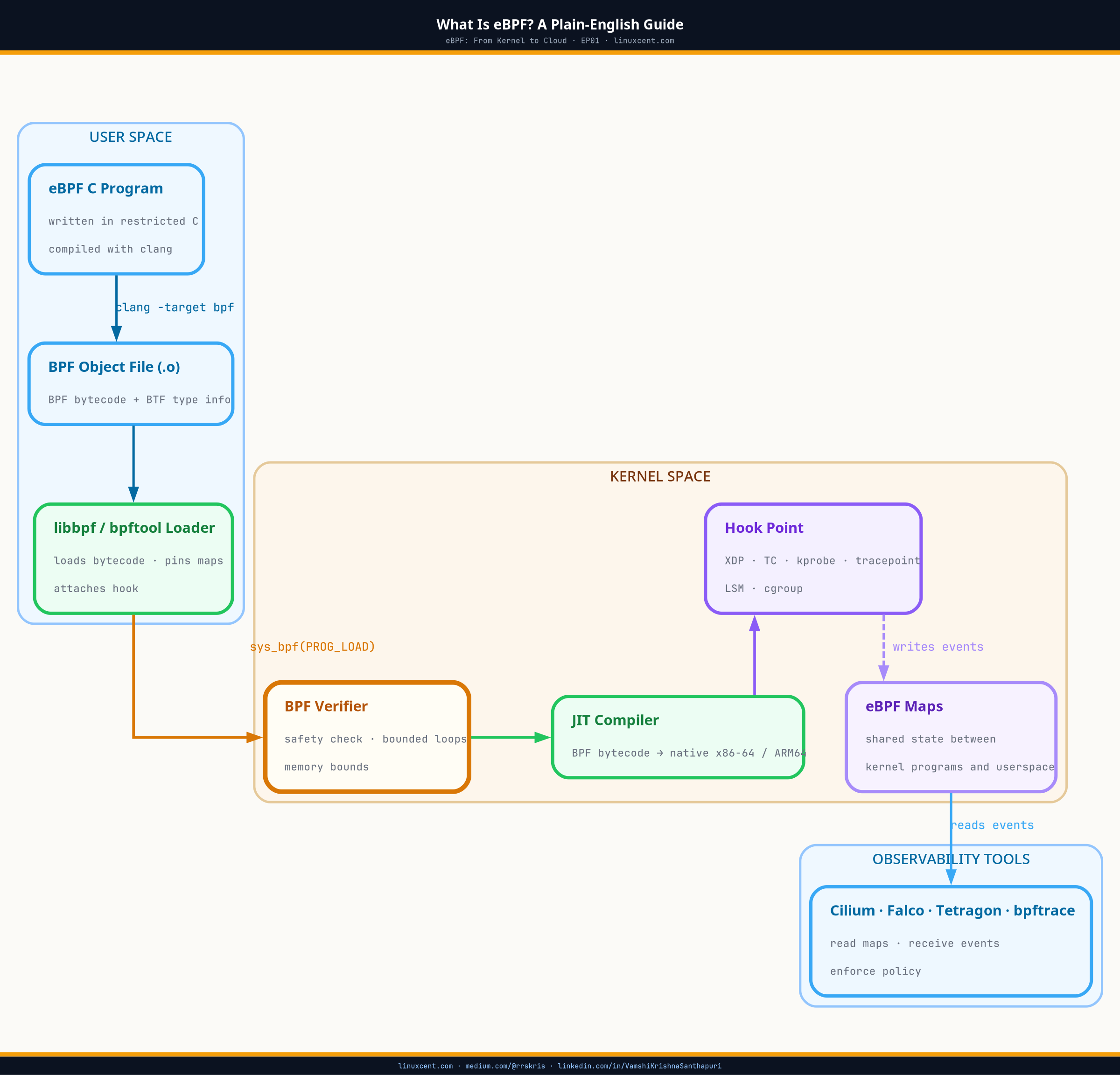
What Is eBPF — architecture diagram showing eBPF program types, verifier, JIT compiler, and kernel hook points
eBPF sits between user space and the kernel — attaching programs to hook points without modifying kernel source.

TL;DR

  • eBPF lets you run small, safe programs inside the Linux kernel — no kernel module, no reboot, no application changes required
  • The name is a historical artefact; modern eBPF is a general-purpose kernel observability and networking platform, not a packet filter
  • Programs attach to kernel hook points (tracepoints, kprobes, socket filters) — giving you visibility into every syscall, file open, and network packet
  • You are probably already running eBPF: Cilium, Falco, Datadog, and systemd all use it under the hood
  • Safe for production because the BPF verifier rejects any program that could crash or loop — covered in depth in EP02
  • Full feature set from Linux 5.8+; meaningful production use from Linux 4.14+ (most EKS and GKE defaults qualify)

First: Forget the Name

eBPF stands for extended Berkeley Packet Filter. It is one of the most misleading names in computing for what the technology actually does.

The original BPF was a 1992 mechanism for filtering network packets — the engine behind tcpdump. The extended version, introduced in Linux 3.18 (2014) and significantly matured through Linux 5.x, is a completely different technology. It is no longer just about packets. It is no longer just about filtering.

Forget the name. Here is what eBPF actually is:

eBPF lets you run small, safe programs directly inside the Linux kernel — without writing a kernel module, without rebooting, and without modifying your applications.

That is the complete definition. Everything else is implementation detail. The one-liner above is what matters for how you use it day to day.


What the Linux Kernel Can See That Nothing Else Can

To understand why eBPF is significant, you need to understand what the Linux kernel already sees on every server and every Kubernetes node you run.

The kernel is the lowest layer of software on your machine. Every action that happens — every file opened, every process started, every network packet sent — passes through the kernel. That means it has a complete, real-time view of everything:

  • Every syscall — every open(), execve(), connect(), write() from every process in every container on the node, in real time
  • Every network packet — source, destination, port, protocol, bytes, and latency for every pod-to-pod and pod-to-external connection
  • Every process event — every fork, exec, and exit, including processes spawned inside containers that your container runtime never reports
  • Every file access — which process opened which file, when, and with what permissions, across all workloads on the node simultaneously
  • CPU and memory usage — per-process CPU time, function-level latency, and memory allocation patterns without profiling agents

The kernel has always had this visibility. The problem was that there was no safe, practical way to access it without writing kernel modules — which are complex, kernel version-specific, and genuinely dangerous to run in production. eBPF is the safe, practical way to access it.


The Problem eBPF Solves — A Real Kubernetes Scenario

Here is a situation every Kubernetes engineer has faced. A production pod starts behaving strangely — elevated CPU, slow responses, occasional connection failures. You want to understand what is happening at a low level: what syscalls is it making, what network connections is it opening, is something spawning unexpected processes?

The old approaches and their problems

Restart the pod with a debug sidecar. You lose the current state immediately. The issue may not reproduce. You have modified the workload.

Run strace inside the container via kubectl exec. strace uses ptrace, which adds 50–100% CPU overhead to the traced process and is unavailable in hardened containers. You are tracing one process at a time with no cluster-wide view.

Poll /proc with a monitoring agent. Snapshot-based. Any event that happens between polls is invisible. A process that starts, does something, and exits between intervals is completely missed.

The eBPF approach

# Use a debug pod on the node — no changes to your workload
$ kubectl debug node/your-node -it --image=cilium/hubble-cli

# Real-time kernel events from every container on this node:
sys_enter_execve  pid=8821  comm=sh    args=["/bin/sh","-c","curl http://..."]
sys_enter_connect pid=8821  comm=curl  dst=203.0.113.42:443
sys_enter_openat  pid=8821  comm=curl  path=/etc/passwd

# Something inside the pod spawned a shell, made an outbound connection,
# and read /etc/passwd — all visible without touching the pod.

Real-time visibility. No overhead on your workload. Nothing restarted. Nothing modified. That is what eBPF makes possible.


Tools You Are Probably Already Running on eBPF

eBPF is not a standalone product — it is the foundation that many tools in the cloud-native ecosystem are built on. You may already be running eBPF on your nodes without thinking about it explicitly.

Tool What eBPF does for it Without eBPF
Cilium Replaces kube-proxy and iptables with kernel-level packet routing. 2–3× faster at scale. iptables rules — linear lookup, degrades with service count
Falco Watches every syscall in every container for security rule violations. Sub-millisecond detection. Kernel module (risky) or ptrace (high overhead)
Tetragon Runtime security enforcement — can kill a process or drop a network packet at the kernel level. No practical alternative at this detection speed
Datadog Agent Network performance monitoring and universal service monitoring without application code changes. Language-specific agents injected into application code
systemd cgroup resource accounting and network traffic control on your Linux nodes. Legacy cgroup v1 interfaces with limited visibility

eBPF vs the Old Ways

Before eBPF, getting deep visibility into a running Linux system meant choosing between three approaches, each with a significant trade-off:

Approach Visibility Cost Production safe?
Kernel modules Full kernel access One bug = kernel panic. Version-specific, must recompile per kernel update. No
ptrace / strace One process at a time 50–100% CPU overhead on the traced process. Unusable in production. No
Polling /proc Snapshots only Events between polls are invisible. Short-lived processes are missed entirely. Partial
eBPF Full kernel visibility 1–3% overhead. Verifier-guaranteed safety. Real-time stream, not polling. Yes

Is It Safe to Run in Production?

This is always the first question from any experienced Linux admin, and it is exactly the right question to ask. The answer is yes — and the reason is the BPF verifier.

Before any eBPF program is allowed to run on your node, the Linux kernel runs it through a built-in static safety analyser. This analyser examines every possible execution path and asks: could this program crash the kernel, loop forever, or access memory it should not?

If the answer is yes — or even maybe — the program is rejected at load time. It never runs.

This is fundamentally different from kernel modules. A kernel module loads immediately with no safety check. If it has a bug, you find out at runtime — usually as a kernel panic. An eBPF program that would cause a panic is rejected before it ever loads. The safety guarantee is mathematical, not hopeful.

Episode 2 of this series covers the BPF verifier in full: what it checks, how it makes Cilium and Falco safe on your production nodes, and what questions to ask eBPF tool vendors about their implementation.


Common Misconceptions

eBPF is not a specific tool or product. It is a kernel technology — a platform. Cilium, Falco, Tetragon, and Pixie are tools built on top of it. When a vendor says “we use eBPF”, they mean they build on this kernel capability, not that they share a single implementation.

eBPF is not only for networking. The Berkeley Packet Filter name suggests networking, but modern eBPF covers security, observability, performance profiling, and tracing. The networking origin is historical, not a limitation.

eBPF is not only for Kubernetes. It works on any Linux system running kernel 4.9+, including bare metal servers, Docker hosts, and VMs. K8s is the most popular deployment target because of the observability challenges at scale, but it is not a requirement.

You do not need to write eBPF programs to benefit from eBPF. Most Linux admins and DevOps engineers will use eBPF through tools like Cilium, Falco, and Datadog — never writing a line of BPF code themselves. This series covers the writing side later. Understanding what eBPF is makes you a significantly better user of these tools today.


Kernel Version Requirements

eBPF is a Linux kernel feature. The capabilities available depend directly on the kernel version running on your nodes. Run uname -r on any node to check.

Kernel What becomes available
4.9+ Basic eBPF support. Tracing, socket filtering. Most production systems today meet this minimum.
5.4+ BTF (BPF Type Format) and CO-RE — programs that adapt to different kernel versions without recompile. Recommended minimum for production tooling.
5.8+ Ring buffers for high-performance event streaming. Global variables. The target kernel for Cilium, Falco, and Tetragon full feature support.
6.x Open-coded iterators, improved verifier, LSM security enforcement hooks. Amazon Linux 2023 and Ubuntu 22.04+ ship 5.15 or newer and are fully eBPF-ready.

EKS users: Amazon Linux 2023 AMIs ship with kernel 6.1+ and support the full modern eBPF feature set out of the box. If you are still on AL2, the migration also resolves the NetworkManager deprecation issues covered in the EKS 1.33 post.


The Bottom Line

eBPF is the answer to a question Linux engineers have been asking for years: how do I get deep visibility into what is happening on my servers and Kubernetes nodes — without adding massive overhead, injecting sidecars, or risking a kernel panic?

The answer is: run small, safe programs at the kernel level, where everything is already visible. Let the BPF verifier guarantee those programs are safe before they run. Stream the results to your observability tools through shared memory maps.

The tools you already use — Cilium for networking, Falco for security, Datadog for APM — are built on this foundation. Understanding eBPF means understanding why those tools work the way they do, what they can and cannot see, and how to evaluate new tools that claim to use it.

Every eBPF-based tool you run on your nodes passed through the BPF verifier before it touched your cluster. Episode 2 covers exactly what that means — and why it matters for your infrastructure decisions.


Further Reading


Questions or corrections? Reach me on LinkedIn. If this was useful, the full series index is on linuxcent.com — search the eBPF Series tag for all episodes.

Enterprise Awakening: RBAC, CRDs, Cloud Providers, and Helm Goes Mainstream (2016–2018)

Reading Time: 6 minutes


Introduction

By the end of 2016, engineers were running Kubernetes in production. Not as an experiment — in production, handling real traffic. And that’s where the real gaps became visible.

The 2016–2018 period is the era when Kubernetes grew up. RBAC went stable. CRDs replaced the fragile ThirdPartyResource hack. The major cloud providers launched managed services. Helm became the standard for packaging. And the security posture, which had been an afterthought in the Borg-derived model, started getting serious attention.


Kubernetes 1.6 — The RBAC Milestone (March 2017)

Kubernetes 1.6 is the release that made enterprise Kubernetes possible. The headline feature: RBAC (Role-Based Access Control) promoted to beta, enabled by default.

Before RBAC, Kubernetes had attribute-based access control (ABAC) — a flat policy file on the API server that required a restart to change. It worked, but it was operationally painful and offered no granularity at the namespace level.

RBAC introduced four objects:
Role: A set of permissions scoped to a namespace
ClusterRole: A set of permissions cluster-wide or reusable across namespaces
RoleBinding: Assigns a Role to a user/group/service account in a namespace
ClusterRoleBinding: Assigns a ClusterRole cluster-wide

# Example: read-only access to pods in the dev namespace
apiVersion: rbac.authorization.k8s.io/v1
kind: Role
metadata:
  namespace: dev
  name: pod-reader
rules:
- apiGroups: [""]
  resources: ["pods"]
  verbs: ["get", "watch", "list"]
---
apiVersion: rbac.authorization.k8s.io/v1
kind: RoleBinding
metadata:
  name: read-pods
  namespace: dev
subjects:
- kind: User
  name: alice
  apiGroup: rbac.authorization.k8s.io
roleRef:
  kind: Role
  name: pod-reader
  apiGroup: rbac.authorization.k8s.io

Also in 1.6:
etcd v3 as default: Better performance, watch semantics, and transaction support
Node Authorization mode: Kubelets can now only access secrets and pods bound to their own node — a critical lateral movement restriction
Audit logging (alpha): API server logs every request — who did what, to which resource, at what time
– Scale: Tested to 5,000 nodes per cluster

The node authorization mode deserves more attention than it typically gets. Before 1.6, a compromised kubelet could read all secrets in the cluster. Node authorization restricted the kubelet to only the secrets it needed for pods scheduled on that node. This single change dramatically reduced the blast radius of a node compromise.


Kubernetes 1.7 — Custom Resource Definitions (June 2017)

The most significant architectural decision in Kubernetes history after the initial design: ThirdPartyResources (TPRs) were replaced with CustomResourceDefinitions (CRDs).

TPRs were a fragile mechanism introduced in 1.2 that let users define custom API types. They had serious limitations: no schema validation, no versioning, data loss bugs, and poor upgrade behavior. In 1.7, they were replaced with CRDs.

CRDs are what make the Kubernetes API extension model work. They let you define new resource types that the API server stores and serves, with optional schema validation via OpenAPI v3 schemas, version conversion, and admission webhook integration.

apiVersion: apiextensions.k8s.io/v1
kind: CustomResourceDefinition
metadata:
  name: databases.stable.example.com
spec:
  group: stable.example.com
  versions:
  - name: v1
    served: true
    storage: true
    schema:
      openAPIV3Schema:
        type: object
        properties:
          spec:
            type: object
            properties:
              size:
                type: string
              version:
                type: string
  scope: Namespaced
  names:
    plural: databases
    singular: database
    kind: Database

CRDs enabled the entire Operator ecosystem that would define the next phase of Kubernetes. Without stable, schema-validated custom resources, you can’t build reliable controllers on top of them.

Also in 1.7:
Secrets encryption at rest (alpha): Finally, secrets stored in etcd could be encrypted with AES-CBC or AES-GCM
Network Policy promoted to stable: CNI plugins implementing NetworkPolicy could now enforce pod-level ingress/egress rules
API aggregation layer: Extend the Kubernetes API with custom API servers — the foundation for metrics-server and other API extensions


Kubernetes 1.8 — RBAC Goes Stable (September 2017)

RBAC graduated to stable in 1.8. This was the point of no return for enterprise adoption. Security teams could now enforce least-privilege on Kubernetes API access with a documented, stable API.

Key additions:
Storage Classes stable: Dynamic volume provisioning — request a PersistentVolume and have the underlying storage (EBS, GCE PD, NFS) automatically provisioned
Workloads API (apps/v1beta2): Deployments, ReplicaSets, DaemonSets, and StatefulSets all moved under a unified API group, signaling they were heading toward stable

The admission webhook framework — which would become the foundation for policy enforcement tools like OPA/Gatekeeper — was also being refined in this period.


The Cloud Provider Moment (2017–2018)

October 2017: Docker Surrenders

At DockerCon Europe in October 2017, Docker Inc. announced that Docker Enterprise Edition would ship with Kubernetes support alongside Docker Swarm. This was, effectively, Docker Inc. conceding the orchestration market to Kubernetes. Swarm remained available, but the message was clear: Kubernetes was the production standard.

October 2017: Microsoft Previews AKS

Microsoft previewed Azure Kubernetes Service at DockerCon Europe. The managed Kubernetes race was on.

November 2017: Amazon Announces EKS

At AWS re:Invent 2017, Amazon announced Elastic Kubernetes Service. The three major cloud providers — Google (GKE, running since 2014), Microsoft (AKS), and Amazon (EKS) — were all committed to managed Kubernetes.

For enterprise buyers, this was the signal they needed. Kubernetes was no longer a bet on an experimental technology — it was the supported, managed offering from every major cloud provider.


Kubernetes 1.9 — Workloads API Stable (December 2017)

The Workloads API (apps/v1) went stable in 1.9. This matters because it locked in the API contract for Deployments, ReplicaSets, DaemonSets, and StatefulSets. Infrastructure built on these APIs would not break on upgrades.

# apps/v1 Deployment — the stable form that operators rely on
apiVersion: apps/v1
kind: Deployment
metadata:
  name: nginx-deployment
spec:
  replicas: 3
  selector:
    matchLabels:
      app: nginx
  template:
    metadata:
      labels:
        app: nginx
    spec:
      containers:
      - name: nginx
        image: nginx:1.14.2
        ports:
        - containerPort: 80
        resources:
          requests:
            memory: "64Mi"
            cpu: "250m"
          limits:
            memory: "128Mi"
            cpu: "500m"

Also in 1.9:
Windows container support moved to beta — actual Windows Server 2016 nodes in a cluster
CoreDNS available as an alternative to kube-dns: A more extensible, plugin-based DNS server that would replace kube-dns as the default in 1.11


Kubernetes 1.10 — Storage, Auth, and Scale (March 2018)

1.10 continued the enterprise hardening:
CSI (Container Storage Interface) beta: A standardized interface between Kubernetes and storage providers. Before CSI, storage drivers were compiled into the kubelet binary. CSI moved them out-of-tree, allowing storage vendors to ship their own drivers without waiting for a Kubernetes release
External credential providers (alpha): Authenticate against external systems (cloud IAM, HashiCorp Vault) for kubeconfig credentials
Node problem detector stable: Detect and report node-level problems (kernel deadlocks, corrupted file systems) as Kubernetes events and node conditions

The CSI transition was one of the most important infrastructure decisions of this period. It decoupled storage driver development from the Kubernetes release cycle — a necessary step for cloud providers to ship storage integrations rapidly and independently.


The Istio Announcement and Service Mesh Wars (May 2017)

Google and IBM announced Istio in May 2017 — a service mesh that layered mTLS, traffic management, and observability on top of existing Kubernetes deployments without changing application code.

Istio’s architecture: sidecar proxies (Envoy) injected into every pod, managed by a control plane. Every service-to-service call passes through the sidecar, enabling:
– Mutual TLS between services (zero-trust networking at the service layer)
– Fine-grained traffic control (canary releases, circuit breaking, retries)
– Distributed tracing and metrics

Linkerd (from Buoyant) had been working on the same problem since 2016. The two projects would compete for the “service mesh standard” throughout 2017–2019.

The service mesh conversation was fundamentally a security architecture conversation: how do you enforce mutual authentication and encryption between services in a Kubernetes cluster without requiring application developers to implement it?


CoreOS Acquisition and the Operator Pattern (2018)

In January 2018, Red Hat acquired CoreOS for $250 million. CoreOS had contributed two things that would permanently shape Kubernetes:

1. The Operator Pattern (introduced by CoreOS engineers Brandon Philips and Josh Wood in 2016): An Operator is a custom controller that uses CRDs to manage the lifecycle of complex, stateful applications. The etcd Operator (CoreOS’s own) was the first — it automated etcd cluster creation, scaling, backup, and failure recovery. The pattern generalized: a Prometheus Operator, a PostgreSQL Operator, a Kafka Operator.

The Operator pattern is the answer to the question “how do you encode operational knowledge into software?” A human operator knows how to deploy, scale, backup, and recover a database. An Operator codifies that knowledge into a controller loop.

# Operator pattern: watch CRD → reconcile → manage application
CRD (EtcdCluster) → Operator Controller watches → creates/updates Pods, Services, Snapshots

2. etcd: The distributed key-value store that backs the Kubernetes control plane. CoreOS built and maintained etcd. Red Hat acquiring CoreOS meant that the company maintaining Kubernetes’s most critical dependency (after the kernel) was now inside the Red Hat/IBM orbit.


Helm 2 and the Charts Ecosystem

By 2017–2018, Helm had become the de facto package manager for Kubernetes. The public Helm chart repository hosted hundreds of charts — databases (PostgreSQL, MySQL, Redis), monitoring (Prometheus, Grafana), ingress controllers (nginx), CI/CD tools (Jenkins, GitLab Runner).

Helm 2 introduced Tiller — a server-side component that managed release state in the cluster. Tiller became the most criticized security decision in the Kubernetes ecosystem: Tiller ran with cluster-admin privileges by default, meaning any user who could reach Tiller’s gRPC endpoint could do anything in the cluster.

Security teams hated Tiller. The Helm team addressed it in Helm 3 (2019) by removing Tiller entirely and storing release state as Kubernetes Secrets instead.


Key Takeaways

  • RBAC going stable in 1.8 was the single most important security event in early Kubernetes history — it gave enterprises the access control model they needed for production
  • CRDs replacing TPRs in 1.7 enabled the entire Operator ecosystem that would define the next phase of Kubernetes
  • Docker Inc.’s October 2017 announcement that it would support Kubernetes in Docker EE effectively ended the container orchestration wars
  • The three major cloud providers (GKE, AKS, EKS) all standardizing on managed Kubernetes drove enterprise adoption faster than any feature announcement could
  • The Operator pattern — Kubernetes controllers that encode operational knowledge — emerged from CoreOS and became the standard model for managing complex stateful applications
  • Helm filled a real gap but Tiller’s cluster-admin model was a security debt the community had to repay in Helm 3

What’s Next

← EP02: The Container Wars | EP04: The Operator Era →

Series: Kubernetes: From Borg to Platform Engineering | linuxcent.com
The Container Wars: Kubernetes 1.0, CNCF, and the Fight for Orchestration (2014–2016)

Reading Time: 6 minutes


Introduction

Three orchestration systems entered the arena in 2015. Only one would still matter three years later.

Docker had created the container revolution. Now everyone needed to run containers at scale, and three camps formed around three very different philosophies. Understanding why Kubernetes won — and how close it came to not winning — explains most of the design choices that still shape Kubernetes today.


The State of Container Orchestration in 2014

When Kubernetes made its public debut at DockerCon 2014, it entered a space that didn’t yet have a name. “Container orchestration” wasn’t a category. It was a problem people had started to feel but not yet articulate.

Three approaches emerged nearly simultaneously:

Docker Swarm (announced December 2014): Docker’s answer to orchestration, built on the premise that the tool you use to run containers should also be the tool you use to cluster them. Swarm used the same Docker CLI and Docker API — zero new concepts for developers already using Docker.

Apache Mesos (Mesosphere Marathon): Mesos predated Docker. It was a distributed systems kernel originally developed at Berkeley, used in production at Twitter, Airbnb, and Apple. Marathon was the framework for running long-running services on top of Mesos. Mesos could run Docker containers, Hadoop jobs, and Spark workloads on the same cluster. Serious infrastructure engineers took it seriously.

Kubernetes: The newcomer with Google’s name behind it, but no track record outside Google, and early versions that required significant operational expertise to run.


Kubernetes v1.0: July 21, 2015

The 1.0 release landed at the first CloudNativeCon/KubeCon in San Francisco on July 21, 2015. The timing was deliberate — it coincided with the announcement of the Cloud Native Computing Foundation.

What shipped in 1.0:

  • Pods: The core scheduling unit — one or more containers sharing a network namespace and storage
  • Replication Controllers: Keep N copies of a pod running (later replaced by ReplicaSets and Deployments)
  • Services: A stable virtual IP and DNS name in front of a set of pods
  • Namespaces: Soft multi-tenancy boundaries within a cluster
  • Labels and Selectors: The flexible grouping mechanism that makes everything composable
  • Persistent Volumes (basic): Pods could mount persistent storage
  • kubectl: The command-line interface

What was not in 1.0:
– No RBAC (Role-Based Access Control)
– No network policy
– No autoscaling
– No Ingress resources
– No StatefulSets
– No DaemonSets (added in 1.1)
– Secrets were stored in plaintext in etcd

The security posture of a fresh Kubernetes 1.0 cluster was essentially: “trust everything inside the cluster.” That was the inherited assumption from Borg.


The CNCF Formation

Alongside the 1.0 release, Google donated Kubernetes to the newly formed Cloud Native Computing Foundation — a Linux Foundation project. This was a critical strategic move.

By donating Kubernetes to a neutral foundation, Google:
1. Removed the perception of a single vendor controlling the project
2. Created a governance model that made enterprise adoption politically safe
3. Invited competitors (Red Hat, CoreOS, Docker, Microsoft) to contribute without ceding control to them

The CNCF’s initial Technical Oversight Committee included engineers from Google, Red Hat, Twitter, Cisco, and others. This governance model would later become the template for every CNCF project that followed.


v1.1 — v1.5: Building the Foundation (Late 2015–2016)

Kubernetes 1.1 (November 2015)

  • Horizontal Pod Autoscaler (HPA): Automatically scale pod count based on CPU utilization
  • HTTP load balancing: Ingress API added as alpha — pods could now be exposed via HTTP routing rules
  • Job objects: Run a task to completion, not just keep it running
  • Performance: 30% throughput improvement, pods per minute scheduling rate improved significantly

Kubernetes 1.2 (March 2016)

  • Deployments promoted to beta: Rolling updates, rollback, pause/resume — the deployment primitive that engineers actually use for application deployments
  • ConfigMaps: Decouple configuration from container images (no more baking config into images)
  • Daemon Sets stable: Run exactly one pod per node — the pattern for node agents (log shippers, monitoring agents, network plugins)
  • Scale: Tested to 1,000 nodes and 30,000 pods per cluster

Kubernetes 1.3 (July 2016)

  • StatefulSets (then called PetSets, alpha): Ordered, persistent-identity pods — the first serious attempt to run databases and stateful applications
  • Cross-cluster federation (alpha): Run workloads across multiple clusters
  • PodDisruptionBudgets (alpha): Control how many pods can be unavailable during voluntary disruptions — critical for safe rolling updates
  • rkt integration (Rktnetes): First Container Runtime Interface experiment — the kubelet talking to something other than Docker

Kubernetes 1.4 (September 2016)

  • kubeadm: A tool to bootstrap a Kubernetes cluster in two commands. Before kubeadm, setting up a cluster required following Kelsey Hightower’s “Kubernetes the Hard Way” — valuable for learning, painful for production
  • ScheduledJobs (CronJobs): Run a job on a schedule
  • PodPresets: Inject common configuration into pods at admission time
  • Init Containers beta: Containers that run to completion before the main application containers start — the clean solution for initialization sequencing

Kubernetes 1.5 (December 2016)

  • StatefulSets promoted to beta
  • PodDisruptionBudgets to beta
  • Windows Server container support (alpha): First step toward a non-Linux node
  • CRI (Container Runtime Interface) alpha: The abstraction layer that would eventually allow Kubernetes to run containerd, CRI-O, and others instead of depending on Docker
  • OpenAPI spec: Machine-readable API documentation, enabling client code generation

Helm: The Missing Package Manager (February 2016)

Kubernetes gave you primitives. It did not give you a way to install applications composed of those primitives. In February 2016, Deis (later acquired by Microsoft) released Helm — a package manager for Kubernetes.

Helm introduced two concepts that stuck:
Charts: A collection of Kubernetes manifests bundled with templating and default values
Releases: An installed instance of a chart, with its own lifecycle (install, upgrade, rollback, delete)

Helm’s immediate adoption signaled something important: the community was already thinking in terms of applications, not just raw primitives. Infrastructure engineers needed a layer of abstraction above YAML.


The Battle Lines Harden

By mid-2016, the three-way contest was becoming clearer:

Docker Swarm’s advantage: Zero friction for existing Docker users. docker swarm init + docker stack deploy. No new CLI, no new API, no new mental model. For small teams running straightforward applications, it was compelling.

Mesos’s advantage: Proven at Google-scale before Kubernetes existed. Twitter ran Mesos in production. It could run heterogeneous workloads (Docker containers, Hadoop, Spark) on the same cluster. Enterprise data teams already had Mesos expertise.

Kubernetes’s advantage: The Google name, rapidly growing community, and a design that was clearly winning the feature race. But operational complexity was real — running Kubernetes well in 2016 required significant investment.


The Turning Point Nobody Talks About

The real moment that decided the container wars wasn’t a feature announcement. It was cloud provider behavior.

Google Kubernetes Engine (GKE) — then called Google Container Engine — had been running since 2014. It was the first managed Kubernetes service, and it worked. In 2016, both Microsoft and Amazon were working on managed Kubernetes offerings. Neither chose Docker Swarm. Neither chose Mesos.

When cloud providers converge on a technology, the market follows. By the time Amazon announced EKS and Microsoft announced AKS in late 2017, the decision was already made.


The Security Debt Accumulates

Running through the 1.0–1.5 feature list reveals a security architecture that was being designed in flight:

  • etcd stored secrets as base64-encoded strings — not encrypted. Kubernetes 1.7 (2017) would add encryption at rest, but it required explicit configuration
  • The API server was unauthenticated by default in early versions — you needed to configure authentication
  • Network traffic between pods was unrestricted — all pods could reach all other pods on all ports, across all namespaces. NetworkPolicy existed as alpha in 1.3 but required a CNI plugin that supported it
  • The kubelet’s API was open — in early Kubernetes, the kubelet’s HTTP API was accessible without authentication from within the cluster

These weren’t oversights — they were reasonable defaults for an internal cluster managed by a single team. They became liabilities as Kubernetes moved into multi-tenant enterprise environments.


KubeCon: A Community Forms

The first KubeCon conference ran November 9-11, 2015, in San Francisco — a small gathering of a few hundred engineers. By November 2016, KubeCon North America in Seattle drew thousands. The growth was not marketing-driven; it was practitioners solving real problems and sharing what they learned.

This community dynamic was qualitatively different from the Docker Swarm and Mesos ecosystems. Kubernetes had a contributor culture — pull requests, SIG (Special Interest Group) meetings, public design docs. The project was being built in the open, and engineers could see it happening.


Key Takeaways

  • Kubernetes 1.0 shipped in July 2015 with the basics functional but security model immature — no RBAC, no network policy, secrets stored in plaintext
  • The CNCF governance model was the strategic move that made enterprise adoption politically safe — no single vendor controls the project
  • Helm filled the missing application packaging layer that raw Kubernetes couldn’t provide
  • The container wars were decided not by technical superiority alone, but by cloud provider alignment — when Google, Microsoft, and Amazon all built managed Kubernetes, the market followed
  • v1.1–v1.5 established the core workload primitives: Deployments, StatefulSets, DaemonSets, Jobs, ConfigMaps, HPA — most of these remain the daily vocabulary of Kubernetes operations

What’s Next

← EP01: The Borg Legacy | EP03: Enterprise Awakening →

Series: Kubernetes: From Borg to Platform Engineering | linuxcent.com
The Borg Legacy: How Google Built the Blueprint for Kubernetes (2003–2014)

Reading Time: 5 minutes


Introduction

Every piece of infrastructure has a lineage. Kubernetes didn’t appear from nowhere in 2014. It is, in almost every meaningful sense, Google’s Borg system rebuilt for the world — with a decade of hard lessons baked in.

To understand Kubernetes, you have to understand what came before it. And what came before it ran (and still runs) more compute than most organizations will ever touch.


Google’s Scale Problem (2003)

By the early 2000s, Google was running hundreds of thousands of jobs across tens of thousands of machines. Web indexing, ads, Gmail, Maps — all of these needed compute, and none of them could afford to waste it.

In 2003-2004, Google engineer Rohit Seth proposed a kernel feature called cgroups (control groups) — a mechanism to limit, prioritize, account, and isolate resource usage of process groups. The Linux kernel merged cgroups in 2.6.24 (2008). This was the primitive that would later make containers possible.

Simultaneously, Google built Borg — an internal cluster management system that could run hundreds of thousands of jobs, from many thousands of different applications, across many clusters, with each cluster having up to tens of thousands of machines. Borg was never open-sourced. It ran (and still runs) Google’s entire production workload.


What Borg Got Right

Borg introduced concepts that engineers didn’t yet have names for. They became the vocabulary of modern infrastructure:

Workload types:
Borg separated workloads into two classes: long-running services (high-priority, latency-sensitive) and batch jobs (best-effort, preemptible). Kubernetes would later call these Deployments and Jobs.

Declarative specification:
Borg jobs were described in a configuration language (BCL, a dialect of GCL). You declared what you wanted; Borg figured out how to achieve it. Sound familiar?

Resource limits and requests:
Borg tasks had both a request (what you need) and a limit (what you can use). Kubernetes adopted this model directly — resources.requests and resources.limits in pod specs trace directly back to Borg.

Health checking and rescheduling:
Borg monitored task health and automatically rescheduled failed tasks. The kubelet’s liveness and readiness probes are descendants of this.

Cell (cluster) topology:
Borg organized machines into “cells” — what Kubernetes calls clusters. The Borgmaster (control plane) managed the cell.


Omega: The Sequel That Didn’t Ship

Around 2011, Google started building Omega — a more flexible scheduler designed to address Borg’s limitations. Borg had a monolithic scheduler; Omega introduced a shared-state, optimistic-concurrency model where multiple schedulers could operate concurrently without stepping on each other.

A 2013 paper from Google (“Omega: flexible, scalable schedulers for large compute clusters”) made these ideas public. Omega itself stayed internal, but many of its scheduling concepts influenced Kubernetes’ extensible scheduler design.


The Docker Moment (March 2013)

On March 15, 2013, Solomon Hykes stood at PyCon and demonstrated Docker with a five-minute talk titled “The future of Linux Containers.” The demo ran a container. That was it. The room understood immediately.

Docker solved the packaging and distribution problem. Linux had had containers (via LXC and cgroups/namespaces) for years, but running one required deep kernel knowledge. Docker wrapped all of that in a UX that a developer could actually use.

Google’s engineers watched. They recognized the pattern: Docker was doing for containers what the smartphone did for mobile computing — making an existing capability accessible to everyone.

The Google engineers building the next generation of infrastructure realized: once containers become ubiquitous, someone will need to orchestrate them at scale. And they had already built that system internally, twice.


The Decision to Open-Source (Fall 2013)

In late 2013, a small group of Google engineers — Brendan Burns, Joe Beda, Craig McLuckie, Ville Aikas, Tim Hockin, Dawn Chen, Brian Grant, and Daniel Smith — began a new project internally codenamed “Project Seven” (a reference to the Borg drone Seven of Nine).

The core insight: Google’s competitive advantage in infrastructure came from what ran on the cluster management system, not the system itself. Open-sourcing a Kubernetes-like system would benefit Google by standardizing the ecosystem around patterns Google already understood better than anyone.

The initial design decisions were deliberate:

  • Go as the implementation language: Fast compilation, good concurrency primitives, easy deployment as static binaries
  • REST API as the primary interface: Everything in Kubernetes is an API resource. This is not accidental — it makes the system composable and automatable from day one
  • Labels and selectors over hierarchical naming: Borg used a hierarchical job/task naming scheme; Kubernetes chose a flat namespace with label-based grouping, which proved far more flexible
  • Reconciliation loops everywhere: Every Kubernetes controller is a loop that watches actual state and drives it toward desired state. This is the controller pattern, and it is the heart of Kubernetes extensibility

First Commit: June 6, 2014

The first public commit landed on GitHub on June 6, 2014: 250 files, 47,501 lines of Go, Bash, and Markdown.

Three days later, on June 10, 2014, Eric Brewer (VP of Infrastructure at Google) announced Kubernetes publicly at DockerCon 2014. The announcement framed it explicitly as bringing Google’s infrastructure learnings to the community.

By July 10, 2014, Microsoft, Red Hat, IBM, and Docker had joined the contributor community.


What Kubernetes Deliberately Left Out of Borg

The designers made intentional decisions about what not to carry forward:

No proprietary language: Borg’s BCL/GCL was Google-internal. Kubernetes used plain JSON (later YAML) manifests — standard formats any tool could read and write.

No magic autoscaling by default: Borg aggressively reclaimed resources. Kubernetes launched without this, adding HPA (Horizontal Pod Autoscaler) later, allowing operators to control the behavior.

No built-in service discovery tied to the scheduler: Borg had tight coupling between scheduling and name resolution. Kubernetes separated these: Services (kube-proxy, DNS) are distinct from the scheduler, allowing them to evolve independently.


The Borg Paper (2015)

In April 2015, Google published “Large-scale cluster management at Google with Borg” — the first public detailed description of the system. Reading it alongside the Kubernetes documentation reveals how directly the design decisions transferred.

Key numbers from the paper:
– Borg ran hundreds of thousands of jobs from thousands of applications
– Typical cell: 10,000 machines
– Utilization improvements from bin-packing: significant enough to justify the entire engineering investment

The paper is required reading for anyone who wants to understand why Kubernetes is designed the way it is — not as a series of arbitrary choices but as a deliberately evolved system.


The Lineage That Matters for Security

From a security architecture perspective, the Borg lineage matters because the isolation model was designed for a trusted-internal environment, not a multi-tenant hostile-external one. This created a debt that Kubernetes has spent years paying down:

  • Namespaces are a soft boundary, not a hard isolation primitive — just as Borg’s cells were
  • The default-allow network model reflects Borg’s assumption of a trusted internal network
  • No built-in admission control at launch — Borg trusted its job submitters

Understanding this history explains why features like NetworkPolicy, PodSecurity, RBAC, and OPA/Gatekeeper were retrofitted over years rather than built-in from day one. The system was designed by and for Google’s internal trust model. The security hardening came as it entered the wild.


Key Takeaways

  • Kubernetes is Google’s Borg system rebuilt for the world, carrying 10+ years of cluster management experience
  • Core Kubernetes primitives — resource requests/limits, declarative specs, health-based rescheduling, label-based grouping — map directly to Borg concepts
  • The decision to open-source was strategic, not altruistic: Google wanted to standardize the ecosystem on patterns it already mastered
  • The security gaps in early Kubernetes (no default network isolation, permissive RBAC, no pod-level security controls) trace directly to Borg’s trusted-internal-network assumptions
  • Docker’s accessibility breakthrough created the demand; Google’s Borg experience supplied the architecture

What’s Next

EP02: The Container Wars → — Kubernetes 1.0, the CNCF formation, and the three-way fight between Docker Swarm, Apache Mesos, and Kubernetes for control of the container orchestration market.


Series: Kubernetes: From Borg to Platform Engineering | linuxcent.com