TL;DR
- Three Microsoft UEFI Secure Boot certificates expire between June 24 and October 19, 2026
- Any GCP Compute Engine instance with Secure Boot enabled, created before November 7, 2025, carries the old certs and is at risk
- When the certs expire, instances may fail to boot after OS updates that pull in bootloaders signed only by the replacement 2023 certificates
- GKE Shielded Nodes are affected too — node pools whose nodes haven’t been recreated since November 7, 2025 carry the old UEFI database
- vTPM-sealed secrets, BitLocker, and Linux full disk encryption break if Secure Boot fails mid-update
- Primary fix: recreate affected instances (post-Nov 7, 2025 instances include the updated UEFI DB automatically)
- Emergency workaround if boot fails: temporarily disable Secure Boot, apply updates, re-enable
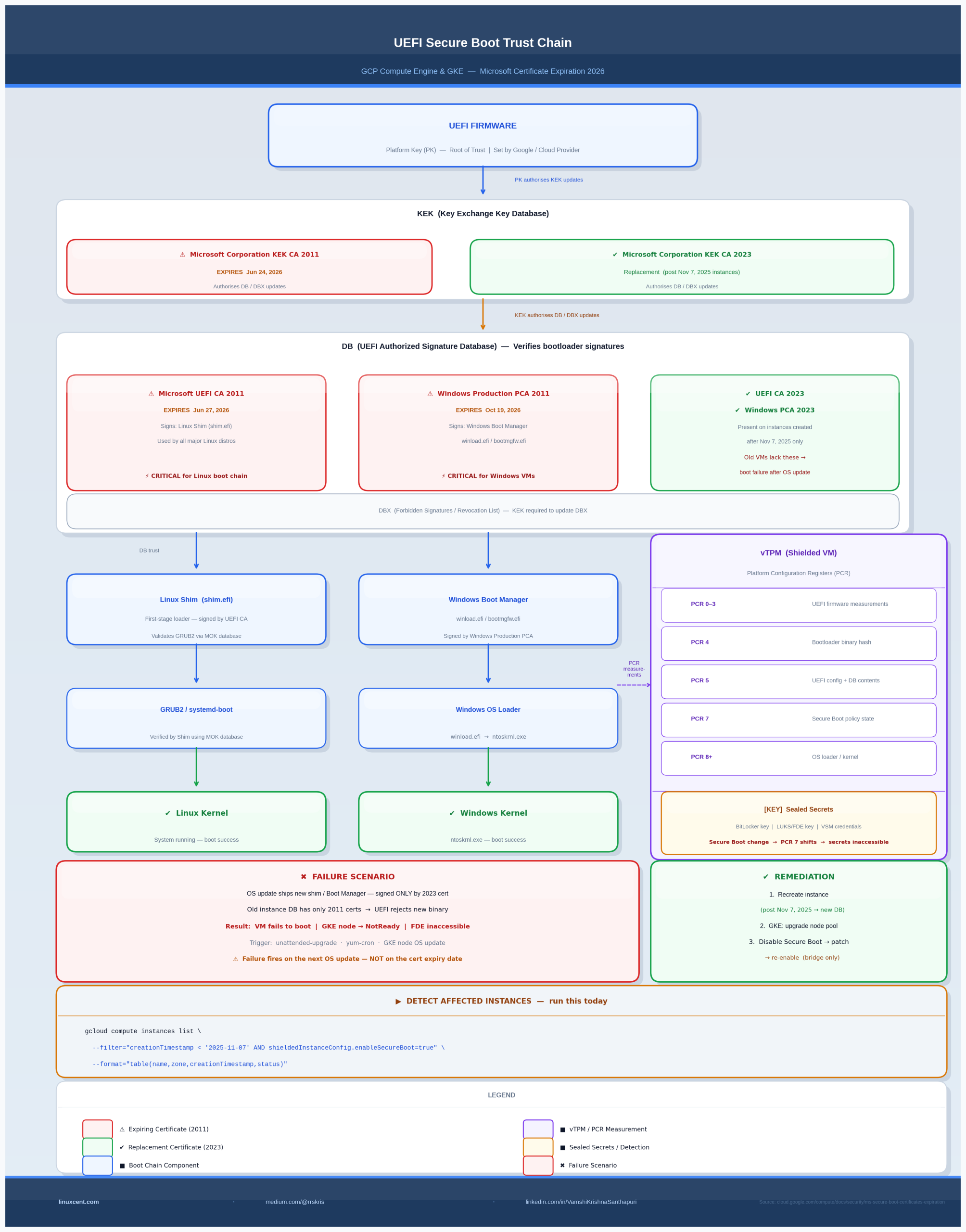
The Big Picture: The UEFI Secure Boot Trust Chain
  UEFI Firmware (PK — Platform Key, set by OEM/Google)
         │
         │  PK signs KEK updates
         ▼
  ┌─────────────────────────────────────────────┐
  │        KEK (Key Exchange Key Database)       │
  │  Microsoft Corporation KEK CA 2011           │ ← EXPIRING Jun 24, 2026
  │  Microsoft Corporation KEK CA 2023           │ ← Replacement (new VMs only)
  └────────────────────┬────────────────────────┘
                       │  KEK authorizes DB/DBX updates
                       ▼
  ┌─────────────────────────────────────────────┐
  │         DB (Authorized Signature Database)   │
  │  Microsoft UEFI CA 2011 ← signs Linux Shim  │ ← EXPIRING Jun 27, 2026
  │  Microsoft Windows PCA 2011 ← signs WinBoot │ ← EXPIRING Oct 19, 2026
  │  Microsoft UEFI CA 2023 ← replacement       │ ← Present on post-Nov 7 VMs
  │  Microsoft Windows PCA 2023 ← replacement   │ ← Present on post-Nov 7 VMs
  └────────┬───────────────────────┬────────────┘
           │                       │
           ▼                       ▼
   Linux Shim (shim.efi)    Windows Boot Manager
           │
           ▼
       GRUB2 / systemd-boot
           │
           ▼
       Linux Kernel
GCP Compute Engine instances with Secure Boot enabled — created before November 7, 2025 — have a UEFI signature database that includes the 2011 certificates but not the 2023 replacements. When those 2011 certificates expire, new bootloader binaries (signed exclusively by the 2023 certs) will be rejected at boot time.
What Secure Boot Actually Does — and Why Certificate Expiry Breaks Booting
Secure Boot is UEFI’s mechanism for ensuring that only cryptographically signed, trusted software runs during the boot sequence. The trust chain works like this:
- Platform Key (PK): Root of trust, set by the hardware manufacturer or cloud provider. Authorizes updates to the KEK.
- Key Exchange Key (KEK): Authorizes modifications to the DB and DBX (the forbidden signatures database). Microsoft holds one KEK slot; OEMs often hold another.
- DB (Signature Database): Contains the public certificates used to verify bootloaders. If a bootloader binary is signed by a cert in DB, it’s allowed to run. If not, the firmware halts.
- DBX (Forbidden Signatures Database): Revocation list. Bootloaders explicitly listed here are blocked even if they were once trusted.
Where expiry matters: The DB certificates don’t “enforce” anything at runtime by checking dates themselves — UEFI doesn’t do certificate revocation in real time. The problem is different and more insidious: as Linux distributions and Microsoft ship updated bootloaders, those new binaries are signed only by the 2023 replacement certificates, not the expiring 2011 ones. If your VM’s DB doesn’t contain the 2023 certs, the UEFI firmware will reject the new shim, and the system won’t boot after an OS update that upgrades the bootloader package.
On Debian/Ubuntu, shim-signed upgrades. On RHEL/CentOS Stream, shim-x64 upgrades. Either way: new binary, new signature, old DB — boot failure.
The Three Certificates Expiring in 2026
1. Microsoft Corporation KEK CA 2011 — expires June 24, 2026
Role: Authorizes updates to the DB and DBX signature databases.
When the KEK expires, firmware that enforces KEK validity may refuse to accept DB/DBX updates signed by this certificate. This means even if Google pushes an out-of-band UEFI DB update containing the 2023 certs, instances with an expired-only KEK slot may not be able to apply it cleanly.
Replacement: Microsoft Corporation KEK CA 2023
2. Microsoft Corporation UEFI CA 2011 — expires June 27, 2026
Role: Signs third-party bootloaders — specifically the Linux Shim (shim.efi).
This is the most critical cert for Linux workloads. Every major Linux distribution uses a shim bootloader as the first-stage loader in a Secure Boot chain. The shim is signed by Microsoft’s UEFI CA because Linux vendors submit their shim builds to Microsoft for signing (to ensure broad UEFI compatibility). When new shim packages are released signed only by UEFI CA 2023, any VM with only the 2011 cert in its DB will reject them.
Replacement: Microsoft UEFI CA 2023
3. Microsoft Windows Production PCA 2011 — expires October 19, 2026
Role: Signs Windows Boot Manager and other Windows boot components.
Windows instances on GCP using Secure Boot are affected by this cert. Post-expiry Windows OS updates that ship a new Boot Manager binary signed exclusively by the 2023 PCA will fail to boot on instances carrying only the 2011 cert.
Replacement: Microsoft Windows Production PCA 2023
Windows-specific signal: Event ID 1801 in the Windows System event log — “Secure Boot CA/keys need to be updated” — will appear by mid-2026 on affected instances, before actual boot failure. This is your warning window.
Why GCP Instances Are Specifically Affected
Google’s Compute Engine Shielded VMs ship with a pre-populated UEFI variable database. The content of that database is fixed at instance creation time — it’s part of the VM’s UEFI firmware image. Instances created before November 7, 2025 have a DB that contains the 2011 certs but not the 2023 replacements. Instances created on or after November 7, 2025 had the updated database backfilled.
This is not a Google-specific failure. Every cloud provider and on-premises hypervisor platform that uses Secure Boot with a pre-populated UEFI DB has the same problem. GCP is ahead of many platforms in actually documenting it.
GKE Shielded Nodes: The Operational Blind Spot
GKE’s Shielded Nodes feature enables Secure Boot on node pool VMs. Each node is a Compute Engine instance — and all the same rules apply.
The risk: Node pools whose nodes were last provisioned before November 7, 2025 carry the old UEFI database. When containerd, the OS image, or the kernel gets updated via node auto-upgrade or manual node pool upgrade, the new node VMs will carry updated certs. But nodes that haven’t been replaced since before the cutoff are sitting on the old DB.
GKE auto-upgrade helps — but only if it’s actually running and has completed at least one full node replacement cycle since November 7, 2025.
Node pools with auto-upgrade disabled, or clusters in maintenance windows that delayed upgrades, are at risk.
The trigger scenario:
1. GKE runs a node OS update in-place on an old node (not a full node replacement)
2. The update upgrades the shim package to a version signed only by UEFI CA 2023
3. Next reboot: the node fails to boot
4. The node is marked NotReady, workloads are rescheduled — but the underlying VM is stuck
Detecting Affected Resources
Compute Engine Instances
gcloud compute instances list \
  --filter="creationTimestamp < '2025-11-07' AND shieldedInstanceConfig.enableSecureBoot=true" \
  --format="table(name,zone,creationTimestamp,shieldedInstanceConfig.enableSecureBoot,status)"
Sample output:
NAME               ZONE           CREATION_TIMESTAMP        ENABLE_SECURE_BOOT  STATUS
prod-api-01        us-central1-a  2024-08-15T10:22:00Z      True                RUNNING   ← at risk
prod-db-02         us-central1-b  2023-11-01T08:15:00Z      True                RUNNING   ← at risk
prod-web-03        us-central1-a  2025-12-01T14:30:00Z      True                RUNNING   ← safe (post-Nov 7)
GKE Node Pools
# List node pools with Secure Boot enabled per cluster
gcloud container clusters list --format="value(name,location)" | while read NAME LOCATION; do
  echo "=== Cluster: $NAME ($LOCATION) ==="
  gcloud container node-pools list \
    --cluster="$NAME" \
    --location="$LOCATION" \
    --filter="config.shieldedInstanceConfig.enableSecureBoot=true" \
    --format="table(name,config.shieldedInstanceConfig.enableSecureBoot,management.autoUpgrade)"
done
Then verify node creation timestamps within affected pools:
gcloud compute instances list \
  --filter="labels.goog-gke-node:* AND creationTimestamp < '2025-11-07' AND shieldedInstanceConfig.enableSecureBoot=true" \
  --format="table(name,zone,creationTimestamp,labels.goog-gke-node)"
Checking the UEFI DB on a Running Instance
SSH into an affected instance and verify which certs are in the DB:
# On the instance (requires mokutil and/or efitools)
sudo mokutil --db | grep -A3 "Subject:"
Look for CN=Microsoft UEFI CA 2023 in the output. Its absence means your instance has only the 2011 certs.
On GKE nodes (where you have node shell access via a DaemonSet or node debug pod):
# Using kubectl debug for node access
kubectl debug node/NODE_NAME -it --image=ubuntu -- bash
# Then inside the debug pod:
chroot /host
mokutil --db 2>/dev/null | grep "Microsoft.*2023" || echo "2023 cert NOT present — node at risk"
Solutions
Option 1: Recreate Instances (Primary — Recommended by Google)
Instances created after November 7, 2025 automatically receive the updated UEFI certificate database. The simplest fix is to recreate affected instances.
For Compute Engine:
# Step 1: Create a machine image (snapshot) of the existing instance
gcloud compute machine-images create INSTANCE_NAME-backup \
  --source-instance=INSTANCE_NAME \
  --source-instance-zone=ZONE

# Step 2: Delete the old instance (after verifying backup)
gcloud compute instances delete INSTANCE_NAME --zone=ZONE

# Step 3: Create new instance from machine image
gcloud compute instances create INSTANCE_NAME \
  --source-machine-image=INSTANCE_NAME-backup \
  --zone=ZONE \
  --shielded-secure-boot \
  --shielded-vtpm \
  --shielded-integrity-monitoring
The new instance will have the post-November 7, 2025 UEFI DB.
For GKE Node Pools:
# Option A: Upgrade the node pool (triggers node recreation)
gcloud container clusters upgrade CLUSTER_NAME \
  --location=LOCATION \
  --node-pool=NODE_POOL_NAME

# Option B: Recreate the node pool entirely
gcloud container node-pools create NODE_POOL_NAME-new \
  --cluster=CLUSTER_NAME \
  --location=LOCATION \
  --shielded-secure-boot \
  --shielded-integrity-monitoring \
  [... your existing pool config ...]

# Then cordon and drain the old pool nodes
kubectl cordon NODE_NAME
kubectl drain NODE_NAME --ignore-daemonsets --delete-emptydir-data

# Finally delete the old node pool
gcloud container node-pools delete NODE_POOL_NAME \
  --cluster=CLUSTER_NAME \
  --location=LOCATION
Option 2: Disable Secure Boot Temporarily (Emergency Workaround)
If an instance has already failed to boot after an OS update, or if you need to apply bootloader updates before recreating the instance:
# Disable Secure Boot on the stopped instance
gcloud compute instances update INSTANCE_NAME \
  --zone=ZONE \
  --no-shielded-secure-boot

# Start the instance
gcloud compute instances start INSTANCE_NAME --zone=ZONE

# SSH in, apply OS updates and any pending bootloader upgrades
# (The system will boot without Secure Boot enforcement)
sudo apt-get update && sudo apt-get upgrade -y   # Debian/Ubuntu
# or
sudo dnf update -y                                # RHEL/CentOS

# Stop the instance again
gcloud compute instances stop INSTANCE_NAME --zone=ZONE

# Re-enable Secure Boot
gcloud compute instances update INSTANCE_NAME \
  --zone=ZONE \
  --shielded-secure-boot

# Start again — now boots with new bootloader binaries
gcloud compute instances start INSTANCE_NAME --zone=ZONE
Note: This workaround doesn’t add the 2023 certs to the DB. It bypasses Secure Boot enforcement temporarily. The underlying UEFI DB still only has the 2011 certs. You still need to recreate the instance to get the updated DB — this is only a bridge to keep the instance alive while you plan migration.
Option 3: Restore from Machine Image
If an instance is already in a boot failure state and the workaround above doesn’t apply:
# List available machine images
gcloud compute machine-images list

# Restore from a pre-failure machine image
gcloud compute instances create INSTANCE_NAME-restored \
  --source-machine-image=MACHINE_IMAGE_NAME \
  --zone=ZONE
Then immediately plan recreation on a post-November 7, 2025 instance.
vTPM, BitLocker, and Full Disk Encryption: The Hidden Risk
For VMs using Shielded VM features beyond just Secure Boot — specifically vTPM with sealed secrets — certificate expiry creates a more dangerous failure mode.
How vTPM sealing works:
  Boot sequence measurements → PCR registers (PCR 0–7 for UEFI, PCR 8–15 for OS)
         │
         ▼
  TPM seals secrets (FDE key, BitLocker key) to specific PCR values
         │
         ▼
  On next boot: PCR values must match for TPM to release the key
         │
         ▼
  If Secure Boot state changes (cert DB changes, Secure Boot disabled) →
  PCR values change → TPM refuses to unseal → FDE fails → disk inaccessible
What this means in practice:
-
Linux FDE (LUKS with TPM2 unsealing): If Secure Boot fails or is temporarily disabled per the workaround above, the TPM will not release the LUKS volume key. The system will drop to a recovery prompt. You need the LUKS recovery passphrase.
-
Windows BitLocker: If PCR values shift (Secure Boot disabled, cert DB changed), BitLocker enters recovery mode. The VM prompts for the BitLocker recovery key on next boot. Without it, the volume is inaccessible.
-
Windows Virtual Secure Mode: VSM uses vTPM to protect credentials. If Secure Boot state changes, VSM-protected secrets become inaccessible until re-enrollment.
Action before any changes:
# For Linux: ensure you have the LUKS recovery key
sudo cryptsetup luksDump /dev/sda3 | grep "Key Slot"

# For Windows: export BitLocker recovery key before touching Secure Boot state
# (Do this from within the running Windows instance via PowerShell)
Get-BitLockerVolume | Select-Object -ExpandProperty KeyProtector | Where-Object {$_.KeyProtectorType -eq "RecoveryPassword"}
Store recovery keys in Secret Manager, not just locally:
# Store LUKS key in GCP Secret Manager
echo -n "YOUR_RECOVERY_KEY" | gcloud secrets create luks-recovery-INSTANCE_NAME \
  --data-file=- \
  --replication-policy=automatic
⚠ Production Gotchas
1. OS update automation is the trigger, not the cert expiry date itself.
The certs don’t enforce anything at runtime. The actual failure happens when an unattended-upgrade, yum-cron, or GKE node OS update pulls in a new shim/Boot Manager binary signed only by the 2023 cert. Instances may fail to boot weeks or months before the official cert expiry date if distros ship updated bootloaders early.
2. GKE surge upgrades can mask the problem — temporarily.
During a node pool upgrade, GKE creates new nodes (with updated certs) before draining old ones. Workloads move to new nodes. The old nodes get deleted. This looks fine — until you realize some in-place operations (node taints, label changes, manual kubelet restarts) could force old nodes to reboot without triggering node replacement.
3. Disabling Secure Boot changes vTPM PCR values — plan FDE recovery before touching anything.
The temporary workaround (disable Secure Boot) will invalidate TPM-bound disk encryption. Have recovery keys ready before running --no-shielded-secure-boot.
4. Windows Event ID 1801 is an early warning — act on it.
If you see this event in your Windows Compute Engine instances before June 2026, that instance has already identified itself as carrying the old certs. Use it as your automated detection signal in Cloud Logging.
# Query Cloud Logging for Event ID 1801 across Windows instances
gcloud logging read 'resource.type="gce_instance" AND jsonPayload.EventID=1801' \
  --format="table(resource.labels.instance_id,timestamp,jsonPayload.Message)" \
  --limit=50
5. Instance templates propagate the old DB.
If you use instance templates or managed instance groups (MIGs) to create VMs, and those templates were created before November 7, 2025, new instances created from them may or may not inherit updated certs depending on how the template configures the UEFI DB. Verify by checking creation timestamp of the resulting instance, not the template.
6. Custom OS images don’t fix this.
Importing a custom image or using a custom OS does not update the UEFI certificate database. The DB is part of the VM’s UEFI firmware state, not the OS disk image. Recreating the instance is the only reliable path.
Quick Reference: Commands
| Task | Command |
|---|---|
| List affected Compute Engine VMs | gcloud compute instances list --filter="creationTimestamp < '2025-11-07' AND shieldedInstanceConfig.enableSecureBoot=true" |
| Check UEFI DB on a Linux VM | sudo mokutil --db \| grep -E "Subject\|Not After" |
| Check for 2023 cert presence | mokutil --db 2>/dev/null \| grep "Microsoft.*2023" \|\| echo "2023 cert absent" |
| Disable Secure Boot (emergency) | gcloud compute instances update INSTANCE --zone=ZONE --no-shielded-secure-boot |
| Re-enable Secure Boot | gcloud compute instances update INSTANCE --zone=ZONE --shielded-secure-boot |
| Find affected GKE nodes | gcloud compute instances list --filter="labels.goog-gke-node:* AND creationTimestamp < '2025-11-07' AND shieldedInstanceConfig.enableSecureBoot=true" |
| Trigger GKE node pool upgrade | gcloud container clusters upgrade CLUSTER --location=LOCATION --node-pool=POOL |
| Store LUKS key in Secret Manager | echo -n "KEY" \| gcloud secrets create NAME --data-file=- |
| Query Windows Event 1801 in Logging | gcloud logging read 'resource.type="gce_instance" AND jsonPayload.EventID=1801' |
| Create machine image backup | gcloud compute machine-images create BACKUP --source-instance=INSTANCE --source-instance-zone=ZONE |
Framework Alignment
| Framework | Domain | Relevance |
|---|---|---|
| CISSP | Domain 7: Security Operations | Patch management, boot integrity, incident response |
| CISSP | Domain 3: Security Architecture | Secure Boot trust chain, TPM integration, cryptographic key lifecycle |
| NIST CSF 2.0 | ID.AM, PR.IP | Asset inventory of affected VMs; integrity protection of boot chain |
| CIS Benchmarks | CIS Google Cloud Computing Foundations | Shielded VM controls, vTPM configuration |
| OWASP Top 10 | A05: Security Misconfiguration | Failure to maintain certificate currency in security-critical infrastructure |
Key Takeaways
- The expiry of three Microsoft UEFI CA certificates in 2026 creates a window where GCP VMs with Secure Boot enabled — created before November 7, 2025 — will fail to boot after pulling in new bootloader packages
- The failure is not instantaneous on the cert expiry date. It’s triggered by the next OS update that ships a bootloader signed exclusively by the 2023 replacement certs
- GKE Shielded Nodes are affected through the same mechanism: node VMs that haven’t been recreated since November 7, 2025 carry the old UEFI database
- vTPM-sealed secrets (FDE, BitLocker, VSM) add a secondary failure mode if Secure Boot state is changed as part of remediation — have recovery keys before touching anything
- Google’s recommended fix is instance recreation. The workaround (disable Secure Boot temporarily) keeps instances alive but doesn’t fix the underlying DB — treat it as a bridge, not a resolution
- Audit now, before June 24. The command is one line. The blast radius of missing this is a production boot failure at 2 AM after a routine security patch run
What’s Next
If you’re running Shielded VMs in production, this certificate expiry is the kind of quiet deadline that fails silently — not with an alarm, but with a VM that doesn’t come back after a patch cycle. The time to audit is before your automated patching runs, not after.
If you found this useful, the linuxcent.com newsletter covers infrastructure security at this depth regularly — kernel internals, cloud platform gotchas, and the operational implications that vendor docs bury in footnotes.
Get the next deep-dive in your inbox when it publishes → [subscribe link]